文件夹目录
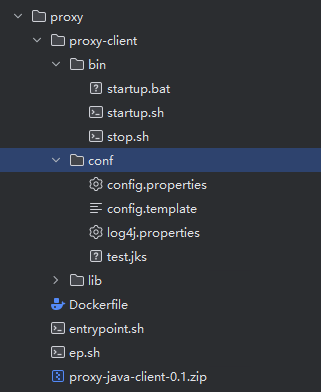
dockerFile
FROM {harbor}/test/openjdk:8-jre
LABEL authors="lhyshome_pc"
ENV TZ=Asia/Shanghai
ADD ./proxy-client /proxy-client
ADD ./ep.sh /ep.sh
RUN apt-get update && apt-get install -y procps
RUN apt-get update && apt-get install -y dos2unix
RUN dos2unix /ep.sh && chmod +x /ep.sh
ENTRYPOINT ["/ep.sh"]
ep.sh
#!/bin/bash

echo "entrypoint.sh start"
# 定义目标配置文件路径
CONFIG_FILE=proxy-client/conf/config.properties

# 替换占位符为环境变量的值
sed -e "s|{{CLIENT_KEY}}|${CLIENT_KEY:-CLIENT_KEY}|g" \
    -e "s|{{SERVER_HOST}}|${SERVER_HOST:-127.0.0.1}|g" \
    -e "s|{{SERVER_PORT}}|${SERVER_PORT:-80}|g" \
    proxy-client/conf/config.template > $CONFIG_FILE

echo "Generated config file:"
cat $CONFIG_FILE

# 启动主程序(根据需要替换为实际启动命令)
exec "proxy-client/bin/startup.sh"
config.template
client.key={{CLIENT_KEY}}
server.host={{SERVER_HOST}}
server.port={{SERVER_PORT}}
docker构建及上传
进入proxy-client的上级目录
docker build -t {harbor}/test/proxy-client:v1.0.0 ./
docker push {harbor}/test/proxy-client:v1.0.0
docker image rm {harbor}/test/proxy-client:v1.0.0
docker部署命令
docker run -e CLIENT_KEY=xxxxx -e SERVER_HOST=xxx.xxx.xxx.xxx -e SERVER_PORT=xxxx –name proxy-client –privileged=true –restart=always -d {harbor}/test/proxy-client:v1.0.0